
Knowledgebase

How to Edit or Delete Cronjob via cPanel?

How to Edit Cronjob?
1. Log into your cPanel account.

2. In the "Advanced" section, click on "Cron Jobs" Icon.

 

3. Scroll down to the end of page and under "Current Cron Jobs", locate your cronjob and then click on the "Edit" button.

4. Make appropriate changes and then click on the "Edit Line" button.


How to Delete Cronjob?
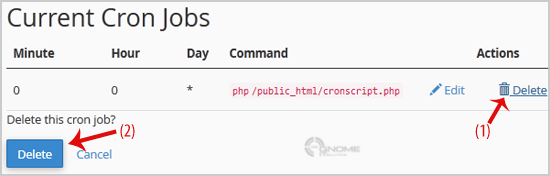
1. Under "Current Cron Jobs", locate your cronjob and then click on "Delete" button
2. Under "Delete this cron job?" text, click the "Delete" Button.

Was this answer helpful?

0 Users Found This Useful

Related Articles

How to update your cPanel Contact Information or receive a notification on reaching quota limit? If you want to receive notification on reaching your disk quota, bandwidth usage limit, reaching email disk quota or want to update your... How to Change cPanel Style/Theme? Switching over to another cPanel theme with a different style is easy and there are two ways to do so.First method: Paper Lantern... How to Edit file in the cPanel File Manager? 1. Log into your cPanel account.2. In the "Files" section, click on "File Manger" Icon. 3. cPanel File Manager will be open, select... How to Change Language of your cPanel? cPanel supports a lot of languages, and if you want to change your cPanel language to your native language, you should follow this... How to Reset my cPanel Account Password? If you can access your cPanel account, follow these steps to reset your password:1. Log into your cPanel account. (eg:...