
Knowledgebase

Change Language of your SiteWorx Account?


SiteWorx supports a lot of languages, and if you want to change your SiteWorx language to your native language, you should follow this tutorial.

1. Log into your SiteWorx account. (e.g. www.example.com:2443/siteworx/ )

2. Under "SiteWorx Menu", click the "Administration" menu item if it is not already open.

3. Click on "User Accounts".
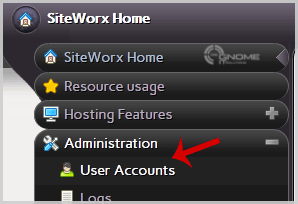
password-reset-user.gif

4. Under "Action" option, Click the "Edit" button.

5. Chose your language from the "Language" dropdown menu and then click on the "Save" button.
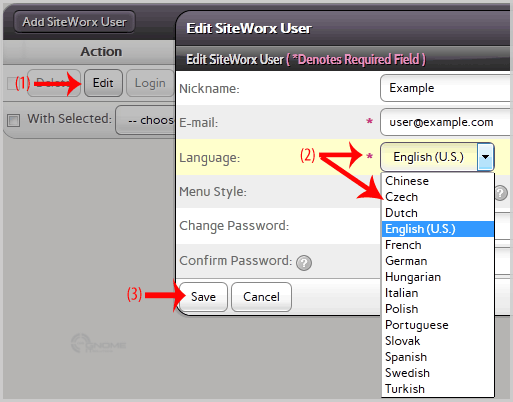
language-change.gif

Your SiteWorx language setting has been successfully updated.

Was this answer helpful?

0 Users Found This Useful

Related Articles

How to Reset my InterWorx (SiteWorx) Account Password? After you access your SiteWorx account, follow these steps to reset your password:1. Log into your SiteWorx account. (eg:... How to update your SiteWorx Email Address? If you want to change your SiteWorx email Address then follow these steps.1. Log into your SiteWorx account. (eg:... How to Access AWStats in SiteWorx? 1. Log into your SiteWorx account. (e.g. www.example.com:2443/siteworx/ )2. Under "SiteWorx Menu", click the "Statistics" menu item if it... How to Access Webalizer in SiteWorx? 1. Log into your SiteWorx account. (e.g. www.example.com:2443/siteworx/ )2. Under "SiteWorx Menu", click the "Statistics" menu item if it... How to upload files via the SiteWorx FileManager? If you don't want to use a 3rd party FTP Software, you can use the SiteWorx's inbuilt File Manager.1. Log into your SiteWorx...