
Knowledgebase

How to forward email to Gmail, Yahoo or other e-mail service providers?


1.
Log into your SiteWorx account. (e.g. www.example.com:2443/siteworx/ )

2. Under "SiteWorx Menu", click the "Hosting Features" menu item if it is not already open.

3. Click the "E-mail" menu item and then click on "Aliases" option.
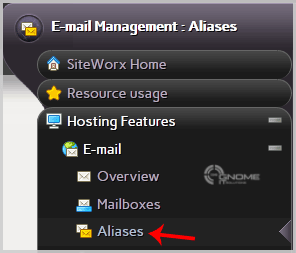
email-aliases-option.gif

4. Enter your email address under "Add an Alias" like "myemail" (without the quotes) in the "E-mail Address" field.

5. In the "Forward To" field, enter your custom e-mail address on which you want to receive forwarded e-mail.

6. Click on the "Add" Button.
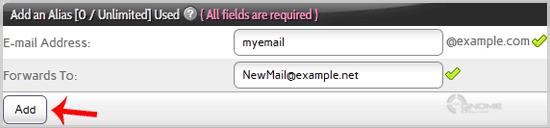
email-aliases-edit.gif

Was this answer helpful?

0 Users Found This Useful

Related Articles

How to Create an E-mail Account with Siteworx? To create a new e-mail address, perform the following steps:1. Log into your SiteWorx account. (e.g. www.example.com:2443/siteworx/ )2.... How to Remove Email account in SiteWorx? To remove a email address, perform the following steps:1. Log into your SiteWorx account (e.g. www.example.com:2443/siteworx/ ).2. Under... How to change your e-mail password at SiteWorx? To change your e-mail password, perform the following steps:1. Log into your SiteWorx account. (eg: www.example.com:2443/siteworx/ )2.... How to Access your Email Account from SiteWorx Webmail? 1. Log into your SiteWorx account. (e.g. www.example.com:2443/siteworx/ )2. Under "SiteWorx Menu", click the "Hosting Features" menu item... How to create an E-mail Autoresponder when you are unavailable or on vacation in SiteWorx? If you are going on a holiday or will be unavailable for a few days or a month, you can create an auto e-mail responder for your e-mails...