
Knowledgebase

How to Disable the Two-Factor Authentication on Your cPanel Account?

If you want to remove the Two-Factor Authentication from your cPanel account, follow this instruction.


1. Log into your cPanel account.
2. In the "Security" section, click on the "Two-Factor Authentication" Icon.
cpanel-two-factor-authentication-icon.gif

3. Click on the "Remove Two-Factor Authentication" button.
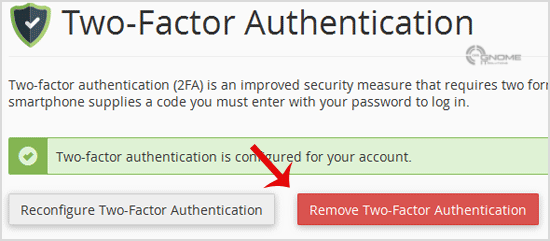
cpanel-two-factor-authentication-disable.gif

4. For confirmation, click on "Remove".
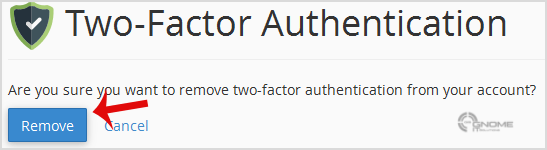
cpanel-2fa-disable-confirm.gif


You will see a message like "Success: The system removed the two-factor authentication from your account".

Was this answer helpful?

0 Users Found This Useful

Related Articles

How to protect your website&#039;s images from an external website? External Website can use < img /> tag to display an image from your site somewhere else on the internet and The end result of this... How to disable directory browsing using .htaccess? For security purposes, we recommend that you to disable directory browsing on your website so no one can see the files/folders of your... How to protect your .htaccess file? For security purpose we recommended you to prevent access to your .htaccess file from unauthorized access.Add this code to your .htaccess... How to restrict directory access by IP address? In order to secure your admin area from hackers, we recommended you to allow access only from your selected IP to your admin directory.... How to ban any IP Address via .htaccess? If someone is trying to hack your website or you want to block their IP Address, you can add this line to your .htaccess file.order...